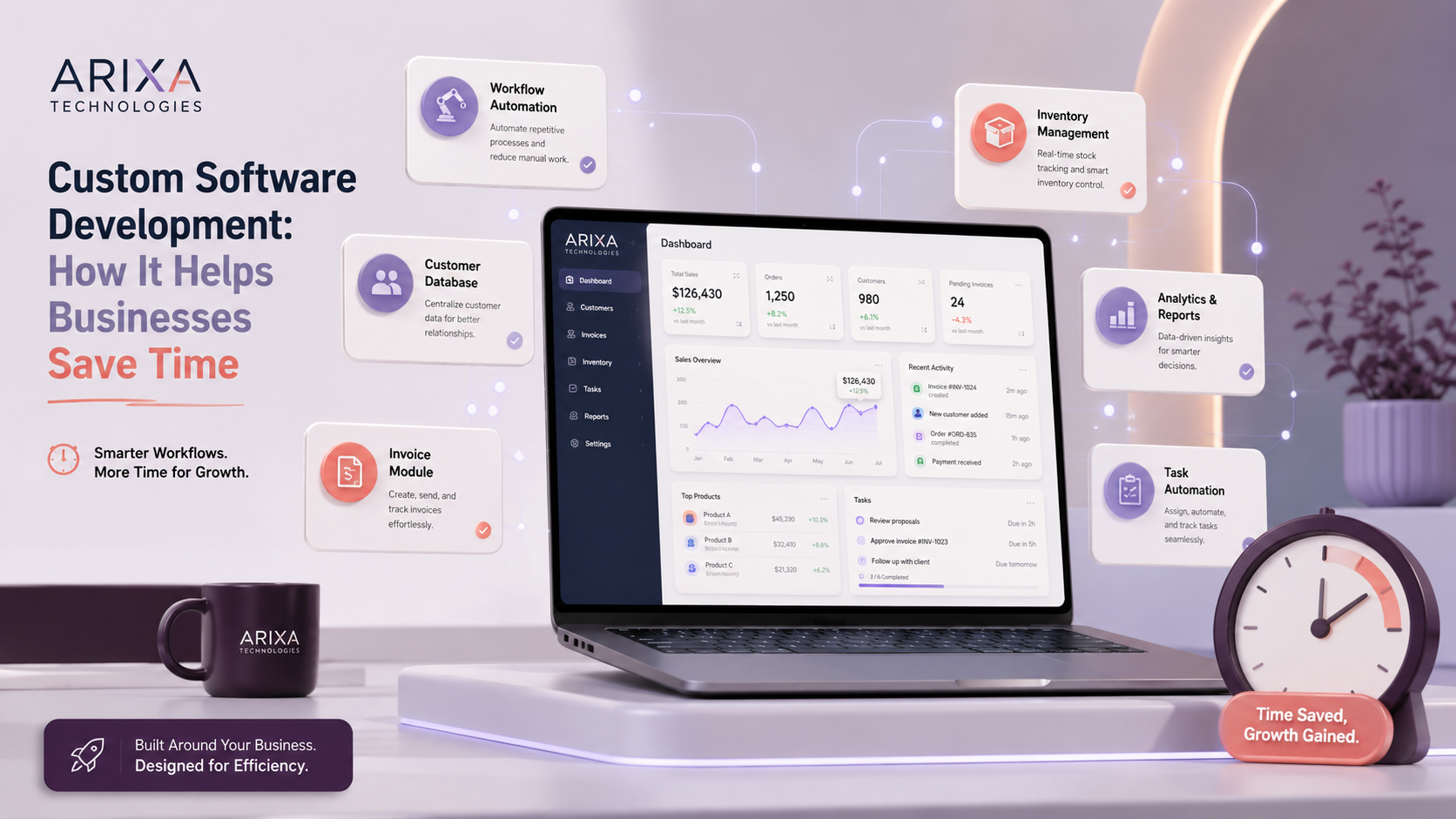
Custom Software Development: How It Helps Businesses Save Time
Learn how custom software can reduce repetitive work, organize business data, automate workflows, improve reporting, and help teams operate more efficiently.
A practical Arixa perspective for businesses planning their next digital move.
Every business has recurring work that consumes time. Customer management, invoicing, payment tracking, inventory, quotations, reporting, lead follow-up, and employee coordination can become difficult when information is managed manually across disconnected tools.
Notebooks, spreadsheets, messages, and generic applications may be sufficient at the beginning. As operations grow, however, teams can spend more time finding information, copying data, correcting mistakes, and maintaining parallel records.
Custom software is designed around a defined business process. When planned and adopted correctly, it can reduce repetitive work, improve data consistency, automate suitable tasks, and provide clearer operational visibility.
This guide explains how custom software development can help businesses save time and work more efficiently.
What is custom software development?
Custom software development is the process of designing and building software for the specific requirements, users, rules, and workflows of an organization.
Unlike a standard product with fixed features, a custom system can be shaped around:
- Business processes
- User roles
- Customer journeys
- Data fields
- Reports
- Integrations
- Approval rules
- Security requirements
- Growth plans
A custom platform can include:
- Admin dashboards
- Customer management
- Invoice and quotation systems
- Inventory management
- Booking workflows
- Lead management
- Payment tracking
- Reports and analytics
- Employee or task management
- Product and service records
- Notifications
- User authentication
- Role-based access
The objective is not to automate everything. It is to improve the workflows where software can create measurable value.
Why businesses consider custom software
Every business operates differently. A garage, school, clinic, shop, agency, manufacturer, and dealer do not use the same data or workflow.
Ready-made tools are often the right choice when they already meet the requirement. Custom software becomes relevant when standard products:
- Require repeated workarounds
- Lack important fields or workflows
- Do not integrate with existing systems
- Provide unsuitable permissions or reports
- Create duplicate data entry
- Cannot support expected growth
Businesses may consider custom software to:
- Reduce repetitive work
- Improve accuracy
- Centralize data
- Track operations
- Improve customer response
- Manage teams and permissions
- Generate useful reports
- Connect existing tools
- Support business-specific workflows
1. Reduce repetitive manual work
Repeated data entry consumes time and increases the chance of inconsistent information.
Custom software can automate or simplify tasks such as:
- Generating invoice numbers
- Calculating configured totals
- Reusing customer information
- Tracking payment status
- Creating reports
- Sending workflow notifications
- Searching records
- Updating stock
- Routing enquiries
Automation should include validation and review where mistakes could have financial, legal, or customer impact.
2. Complete daily operations faster
Different businesses can streamline different workflows:
- A garage can prepare quotations and invoices from saved vehicle and customer records.
- A school can manage enquiries, admissions, and communication status.
- A clinic can manage appointments and patient administration.
- A shop can manage products, sales, and stock.
- A service company can track customer requests and follow-ups.
- An agency can manage leads, projects, approvals, and billing.
The actual time saved depends on process quality, data accuracy, staff adoption, and how well the software matches the work.
3. Keep business data in one controlled system
Businesses often store related information in separate places:
- Customer details in notebooks
- Payments in spreadsheets
- Leads in messages
- Products in separate files
- Reports in physical registers
- Bills in folders
A connected system can centralize:
- Customers
- Products and services
- Invoices and quotations
- Payments
- Inventory
- Leads
- Employees
- Reports
Centralization improves access and consistency, but it also makes security, backups, permissions, and data governance more important.
4. Reduce errors and confusion
Manual processes can produce:
- Incorrect customer details
- Wrong invoice totals
- Duplicate records
- Missing payment updates
- Stock mismatches
- Lost documents
- Calculation errors
- Missed follow-ups
Structured fields, validation rules, automated calculations, unique identifiers, and audit history can reduce these problems.
Software cannot guarantee perfect data. Teams still need clear processes, training, review, and ownership.
5. Improve customer service
Customers expect timely and informed responses.
Authorized staff can use a custom system to find:
- Customer details
- Order or service history
- Payment status
- Previous communication
- Appointment information
- Product availability
- Open requests
Faster access to accurate information can improve customer response and reduce repeated questions.
6. Track payments clearly
A custom payment workflow can show:
- Invoiced amount
- Paid amount
- Balance
- Part payments
- Due dates
- Customer payment history
- Monthly collections
- Outstanding invoices
Clear tracking supports follow-up and cash-flow visibility.
For a deeper billing example, read E-Billing and Invoice Software: Benefits for Small Businesses.
7. Create quotations and invoices faster
Businesses can connect:
- Quotations
- Estimates
- Invoices
- Configured tax calculations
- PDF documents
- Print layouts
- Receipts
- Payment records
An approved quotation can be converted into an invoice without re-entering every line item.
Financial and tax configuration should be verified with a qualified accountant or adviser before production use.
8. Manage inventory
Product-based businesses may need to track:
- Available stock
- Low-stock thresholds
- Product categories
- Purchases
- Sales
- Stock adjustments
- Pricing
- Suppliers
- Branch or warehouse location
Inventory accuracy depends on recording every relevant movement. Software cannot produce reliable stock figures when transactions are skipped or entered incorrectly.
9. Improve team productivity
A shared system can help teams:
- Avoid duplicate data entry
- Access current information
- Track assigned work
- Update customer status
- Follow standard processes
- Generate reports
- Collaborate across departments
Productivity improves when the system is easy to use and removes unnecessary steps. Poorly designed software can create more work instead of less.
10. Generate useful business reports
Custom reports can include:
- Sales
- Payments
- Customers
- Inventory
- Leads
- Employees
- Monthly revenue
- Outstanding balances
- Quotations
- Invoices
Dashboards should focus on decisions the business needs to make, rather than displaying data without context.
11. Manage leads and follow-ups
Businesses can lose opportunities when enquiries are scattered across calls, forms, messages, and personal notes.
A lead-management workflow can track:
- Customer name and contact details
- Required service
- Lead source
- Assigned team member
- Follow-up date
- Current status
- Notes
- Proposal stage
- Conversion outcome
This creates accountability and helps teams follow up consistently.
12. Automate suitable recurring tasks
Potential automation areas include:
- Number generation
- Configured calculations
- Stock updates
- Status changes
- Reminder notifications
- Lead routing
- Form processing
- Document generation
- Scheduled reports
Automation should be introduced after understanding the process. Automating a broken or unclear workflow can reproduce problems faster.
13. Support business growth
A modular system can expand as requirements become clearer.
Future additions may include:
- More users and roles
- Advanced reports
- Mobile applications
- Customer portals
- Online payments
- Notifications
- Inventory modules
- CRM workflows
- Employee management
- Multi-branch support
- Third-party integrations
Scalability requires suitable architecture, data design, monitoring, and maintenance from the beginning.
14. Improve security and access control
Custom software can implement role-based permissions such as:
- Administrators managing the complete system
- Billing staff accessing invoices and payments
- Sales users managing leads
- Managers viewing reports
- Customers viewing only their own records
Important security controls include:
- Secure authentication
- Server-side authorization
- Encrypted network connections
- Input validation
- Audit logs
- Backups
- Safe file handling
- Dependency updates
- Controlled data exports
Permissions must be enforced by the server, not only hidden in the user interface.
15. Reduce operating cost over time
Custom software can reduce operating cost when it removes significant repeated work, avoids expensive errors, improves collections, or replaces unsuitable tools.
Potential benefits include:
- Less repeated data entry
- Fewer manual mistakes
- Reduced paper handling
- Faster information retrieval
- Better payment follow-up
- Improved staff capacity
- More consistent operations
Custom development also has ongoing costs, including hosting, maintenance, support, updates, security, training, and future improvements. A business case should compare the full cost with the expected operational benefit.
Examples of custom business software
Custom systems can include:
- Invoice and billing software
- Quotation systems
- Inventory management
- CRM platforms
- School administration
- Clinic appointments
- Gym management
- Salon booking
- Product catalogues
- E-commerce administration
- Customer portals
- Employee systems
- Lead management
- Reporting dashboards
- Payment tracking
Each system should be scoped around actual users and business rules.
Custom software vs ready-made software
| Comparison | Ready-made software | Custom software |
|---|---|---|
| Features | Standard product features | Defined around approved requirements |
| Flexibility | Limited to available configuration | Greater workflow flexibility |
| Initial cost | Usually lower | Usually higher |
| Implementation speed | Often faster | Requires discovery, design, and development |
| Workflow fit | May require adaptation | Can closely match the workflow |
| Reports | Standard reports | Business-specific reporting |
| Integrations | Limited to supported connectors | Can support planned integrations |
| Ownership | Controlled by provider terms | Depends on the development contract |
| Maintenance | Managed by vendor | Must be planned and funded |
Ready-made software is often best for standard needs. Custom software is appropriate when the workflow or integration value justifies the investment.
Which businesses can benefit from custom software?
Potential use cases exist in:
- Automobile services
- Education
- Clinics and healthcare administration
- Retail and wholesale
- Product dealerships
- Fitness businesses
- Real estate
- Professional services
- Agencies
- Events
- E-commerce
- Logistics
- Manufacturing
The business size alone does not determine suitability. The decision should be based on workflow complexity, repeated work, data needs, risk, and return on investment.
Signs your business may need custom software
Consider a structured software assessment when:
- Teams spend significant time on repeated manual work.
- Multiple spreadsheets contain conflicting information.
- Customer or payment details are frequently lost.
- Follow-ups are missed.
- Inventory cannot be reconciled reliably.
- Staff repeat the same data entry across tools.
- Standard reports do not answer operational questions.
- Existing software requires constant workarounds.
- Important systems need to exchange data.
Before building, document the current process, bottlenecks, users, data, expected outcomes, and budget.
How a custom software project should begin
A responsible project normally starts with:
- Workflow discovery
- User and permission mapping
- Data and integration planning
- Prioritization of essential features
- Prototype or interface planning
- Technical architecture
- Security and backup requirements
- Testing and acceptance criteria
- Deployment and training
- Maintenance planning
Starting with a focused first version usually reduces risk compared with building every possible feature at once.
Website, web app, or mobile app?
Custom business software can be delivered through different interfaces:
- A web application provides browser-based access.
- A mobile application supports mobile-first recurring workflows.
- A business website supports public visibility and lead generation.
- A shared backend can connect multiple interfaces.
The choice should follow user needs rather than technology trends.
Why choose Arixa Technologies?
Arixa Technologies builds custom digital systems for businesses that want to improve operations and support growth.
Services include:
- Business-management systems
- Invoice and billing software
- Quotation workflows
- Inventory management
- CRM systems
- Admin dashboards
- Web applications
- Mobile applications
- Customer portals
- Booking systems
- Reporting dashboards
- Workflow automation
We begin by understanding the business process and defining a practical scope before development.
Our goal is to create software that is understandable, secure, maintainable, scalable, and useful in daily operations.
Final thoughts
Custom software can help businesses save time by reducing repetitive work, organizing data, improving accuracy, tracking payments, generating reports, and supporting faster customer service.
It is most effective when the workflow is clearly defined, the team adopts the system, data is maintained correctly, and long-term support is planned.
If manual processes are limiting operations, a focused custom solution may help the business work more efficiently.
Plan your custom software
Need a business system designed around your workflow?
Contact Arixa Technologies to discuss custom software, invoicing, quotations, inventory, CRM, dashboards, web applications, mobile applications, and workflow automation.
Article FAQ
Questions this topic often raises.
What is custom software development?
Custom software development is the process of designing and building software around the specific users, workflows, data, rules, integrations, and goals of a business.
How does custom software help businesses save time?
Custom software can reduce repetitive data entry, automate suitable tasks, centralize records, create reports, track payments, manage customers, and simplify daily workflows.
Which businesses need custom software?
Custom software can help businesses with unique workflows, repeated manual work, disconnected data, specialized reporting, complex permissions, or integrations that standard tools do not support.
Is custom software better than ready-made software?
Neither is always better. Ready-made software is usually faster and less expensive for standard needs. Custom software is appropriate when business-specific workflow or integration value justifies the additional investment and maintenance.
Can custom software include invoice and billing features?
Yes. A custom system can include quotations, invoices, configured tax calculations, PDF generation, printing, payment status, customer records, and reports.
Can custom software connect with a website?
Yes. Custom software can connect with a business website, admin panel, forms, customer portal, payment gateway, mobile application, and supported third-party services.
Can Arixa Technologies build custom software for my business?
Yes. Arixa Technologies builds custom software, web applications, mobile apps, billing systems, quotation workflows, inventory systems, CRM platforms, dashboards, and business-management solutions.
Is custom software useful for small businesses?
It can be useful when a small business has a valuable repeated workflow that standard software cannot handle efficiently. The expected time savings and operational benefit should justify development and ongoing support costs.